
Klubownik features
Your club’s sign-ups, payments, attendance and communication in one panel
Payments, a phone app, documents, an AI assistant, a website, a shop, a gallery, events, communication and KSeF invoices. You get the core features in every plan, and belts and exams in the Martial Arts module. You turn some options on in the settings.
A new owner’s first club starts with a 30-day trial without a card. Additional clubs use the owner’s subscription.
Explore sample screens
Screenshots are in Polish and use fictional data. Open a larger image to see the details.
 Enlarge screenshot (new tab)
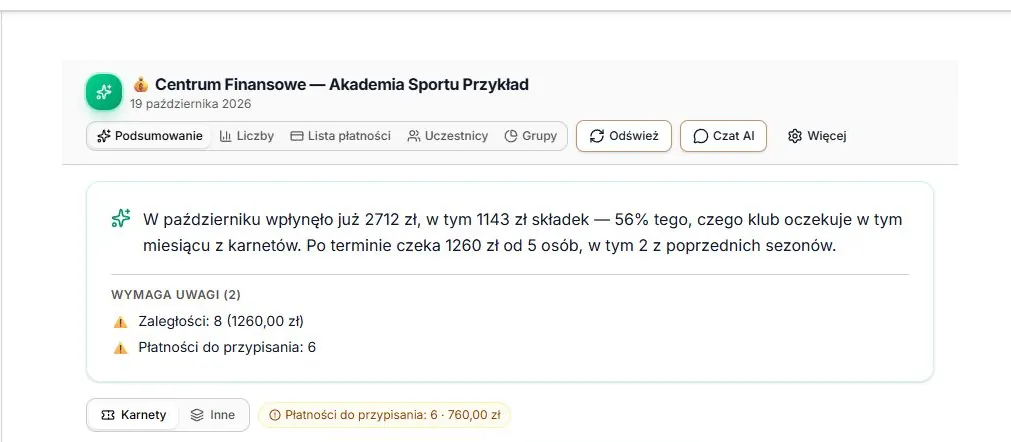
Owner: payments
Payments received and overdue balances in the Finance Centre.
 Enlarge screenshot (new tab)
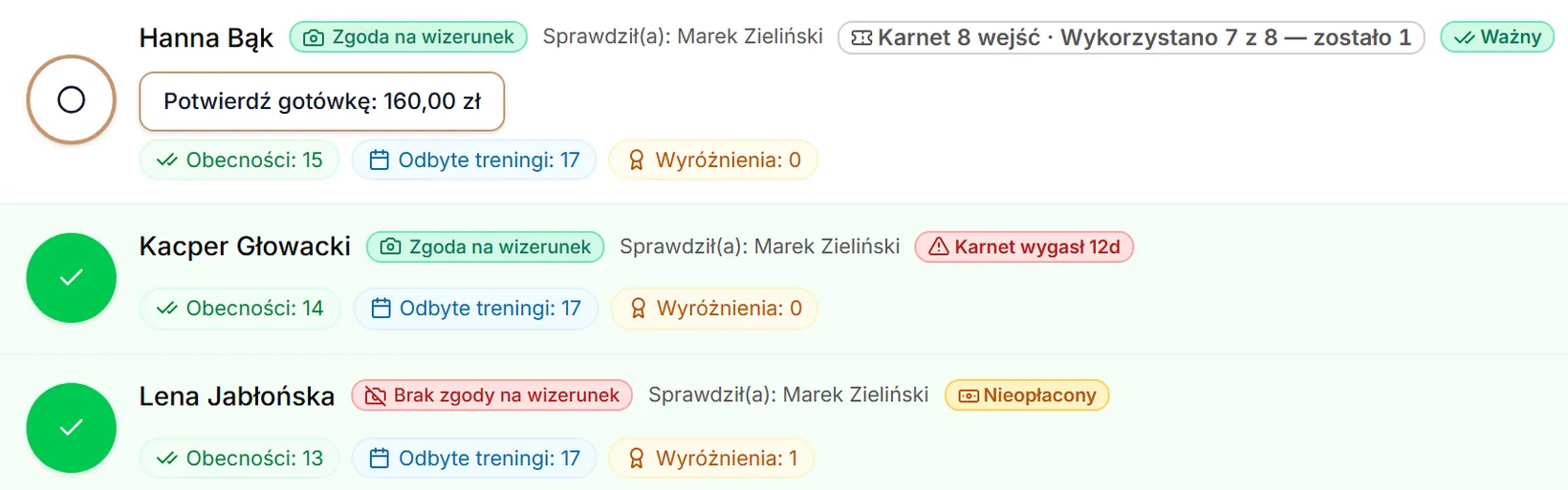
Staff: attendance
A group list with attendance and pass status.
 Enlarge screenshot (new tab)
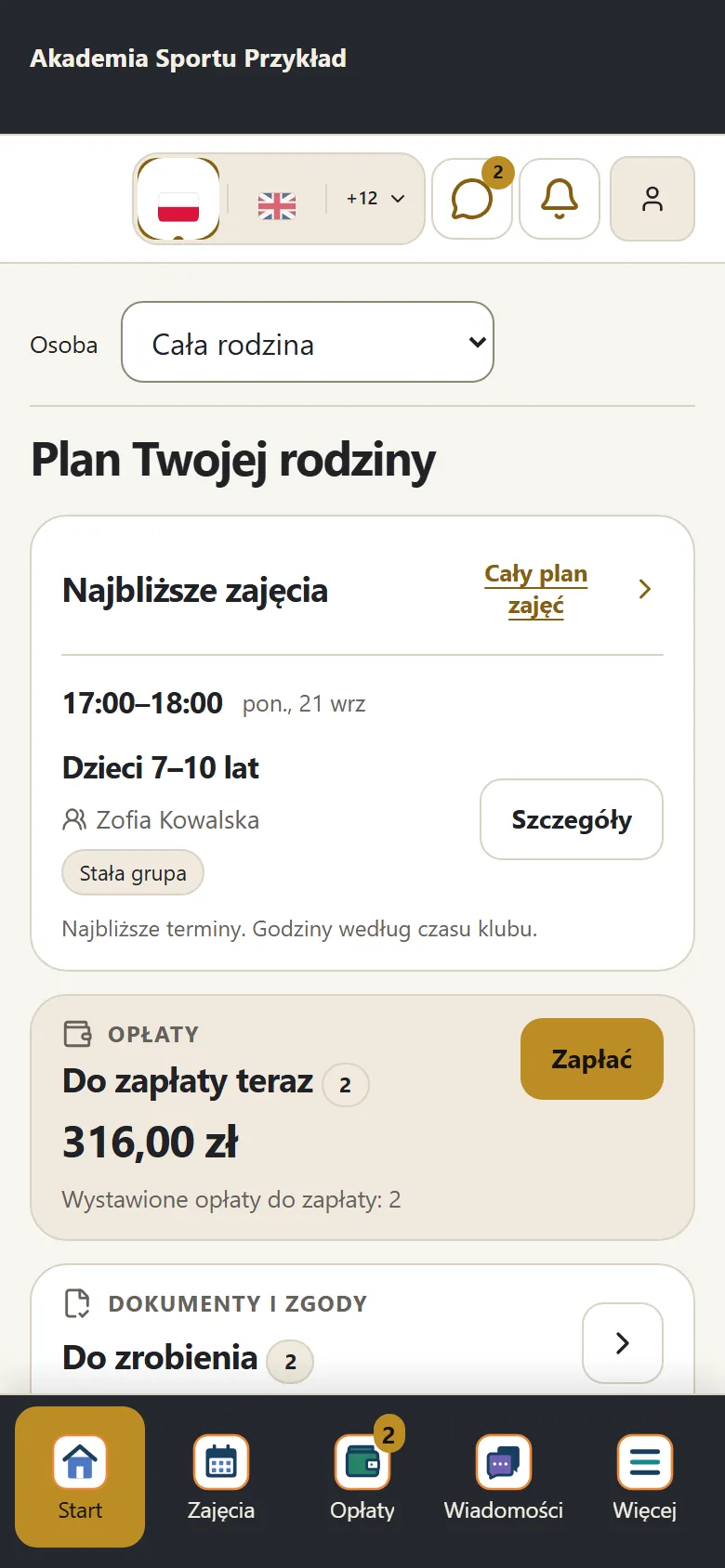
Parent: family plan
Upcoming classes, the amount due and documents to complete.
Payments
Online and cash payments in one place
Membership fees, passes, joining fees and event fees: online (card, plus BLIK in Poland) once your Stripe account is connected, by bank transfer or in cash at the club. The system keeps track of arrears and sends payment reminders on its own. You can issue KSeF invoices once your KSeF account is connected, and fiscal receipts from a cash register — as a pilot for POSNET and ELZAB printers.
See how it worksWhat you actually get
- Card and BLIK payments in the panel, once your Stripe account is connected
- Cash marked from the panel, unified stats
- Family discounts, a shared visit bundle for the family (once enabled in Passes), instalments for camps and courses
- Automatic overdue reminders
- Invoices sent straight to KSeF — once the club’s KSeF account is connected
- Receipts from POSNET and ELZAB printers (pilot) — you turn on automatic printing in the cash register settings
Mobile app
Your club in the browser and mobile app
Coaches, parents and athletes install the club panel from the browser: an icon with the club logo on the home screen, no browser bar, push notifications on Android and iPhone. Parents can also download the Klubownik app from App Store and Google Play. Supported attendance marks and messages can be kept offline in the PWA after the app confirms they were saved.
See how it worksWhat you actually get
- Installed from the browser, no Google or Apple account needed
- An icon with the club logo, no browser bar
- Browser panel notifications: on Android; on iPhone (iOS 16.4+) after adding to the home screen
- Offline in the PWA: supported attendance marks on a previously opened list and messages, after saving is confirmed. Sending requires a connection and the same account; keep the app open in Safari/Firefox. After 7 days from saving or approval, 5 failed attempts, or an error requiring a decision, the entry waits for its author to review it.
- The Klubownik app for parents on App Store and Google Play
- In every plan
Klubownik for parents and participants
Sign in with your account from a club that uses Klubownik. Store availability varies by country. iPhone: iOS 16.4 or later.
Club documents
Club documents and consents in the panel, accepted online
Club rules, GDPR and image-use consents, child safeguarding standards: ready-made templates you adapt to your club. The parent accepts online, and you see who accepted which version and when. You can download the list of acceptances as CSV.
See how it worksWhat you actually get
- Ready-made templates of rules, consents, GDPR clauses and camp documents to adapt
- Child safeguarding standards (clubs based in Poland): a document with appendices, a register of reports, staff confirmations
- Online acceptance with date and time; for documents, the IP address too
- Versioning — you know who accepted which version
- Export acceptances to CSV: who, when, which version
- After a document changes, the parent sees it for acceptance again; you send a reminder in one click
Gamification
Badges, levels and attendance streaks — once gamification is enabled
Participants collect XP points for attendance and earn badges and new levels, and parents see how much is left until the next badge. As the owner or an administrator, you create your own badges, challenges (e.g. “10 sessions in a month”) and rewards. Gamification is off by default — you turn it on in the club settings. Clubs with shooting as their primary module currently have no gamification panel.
What you actually get
- XP for attendance and events; for promotions and challenges — at your own rates
- Badges, levels, attendance streaks and group rankings
- Custom challenges created by the owner or an administrator
- You set the XP multiplier and point rates for the club
- Parents see their child’s badges and progress towards the next one in the panel
- XP history for each participant
Website builder
A club website without a developer — schedule, price list and instructors from the panel
You pick a template (Combat, Studio, Academy) or build the page from blocks, add your logo, photos and description, and publish it at klub.klubownik.pl or on your own domain. The schedule, price list and instructors are pulled from the panel, and the contact form works right away.
See how it worksWhat you actually get
- 3 templates: Combat (martial arts), Studio (fitness), Academy (sports academies)
- A klub.klubownik.pl subdomain or your own domain (after setting up DNS)
- Schedule and price list to embed on another website — they update from the panel
- Descriptions and structured data for Google
- Layout for phones and computers, fonts with Polish characters
- Contact form with spam protection
Club gallery
Private photo gallery for club members
Photos from trainings, camps, and competitions — organized into categories, visible only to members in the app, not on the public club site. Show each category to everyone or to selected training groups, and a parent sees the categories of their child groups. Photos are automatically compressed to WebP, so they take little space.
What you actually get
- Your own photo categories, e.g. training sessions, camps, competitions
- Per-group visibility — a parent sees their child groups
- Private — members only, not the public club site
- Full-screen view with arrows
- Auto-compression to WebP — saves disk space
- Managed by staff: owner, admin, coaches
Club shop
Sell kit, gear, vouchers and event tickets online
A club shop with its own page that you can link from your website: variants (size, colour), stock levels, orders and discount codes. Buyers pay online once your Stripe account is connected and, once enabled, also by bank transfer or in cash on collection; you mark the order as collected. Unpaid orders are cancelled automatically.
See how it worksWhat you actually get
- Products with variants (size, colour, custom label)
- A public shop with no login; you turn on the link on the club website in the website settings
- Payment by card or BLIK (once your Stripe account is connected) and, once enabled, also by bank transfer or cash
- An invoice issued automatically when the buyer asks for one
- Email notification when a sold-out product is back
- Unpaid orders cancel automatically — you set the time allowed for bank transfer and cash
AI assistant
Ask Klubownik about your club’s data — in plain language
You ask: “how many overdue payments do I have in November?”, “who hasn’t been to training for 2 weeks?”, “what was last month’s revenue?”. The assistant reads the club’s data and gives you a link to the right section of the panel.
What you actually get
- The assistant button on most screens of the admin and parent panels
- 17 tools for reading club data
- You ask in plain language
- Simple actions after confirmation: a new group, a plan price, the sign-up mode, a draft announcement
Progression + exams
Belts, ranks and exams in the Martial Arts module
Belts and ranks in every plan with the Martial Arts module: over 30 ready templates (including karate, judo, BJJ, taekwondo, kickboxing, krav maga, aikido, ju-jitsu and muay thai) or your own system — also for MMA. For each rank you set requirements (time in training, number of sessions, age), and parents see the progress. A passed exam records the rank in the athlete’s history right away.
What you actually get
- Over 30 ready rank templates
- Exam planning; rank readiness visible in the athlete’s profile
- Auto-promotion after passing
- Rank history in the athlete’s profile; printable club cards once enabled in settings
- Custom rank systems for any martial arts discipline
- Exam sign-ups via link and widget
Events and camps
Events and camps with separate billing
Each event has its own price, sign-up deadline and capacity. The fee is a separate charge, independent of the membership fee. On the list you see who has paid, who hasn’t and who has cancelled. Online payment works once your Stripe account is connected; you settle camps by bank transfer, with a record of payments and a camp budget. Exams are in the Martial Arts module.
See how it worksWhat you actually get
- A separate event price, independent of the membership fee
- Seat cap, waitlist once enabled, parent panel registrations
- You decide whether and until when a parent can cancel a sign-up themselves
- Payment status of every sign-up and list export to CSV
- Custom event types, e.g. tournament, training course, seminar
- Camp consents and documents signed online when signing up for the camp
CRM and automation
A club that notifies parents about payments, classes and events on its own
The club sends payment reminders, sign-up confirmations, event information and birthday wishes on its own — by email, push and in the app. You can turn on a “come back to us” message after 30 days without training and build your own automations with a recipient segment, quiet hours and a frequency limit.
See how it worksWhat you actually get
- Segments: inactive, overdue, new, birthdays; manual sending to a group or location
- Automatic messages after sign-up, on birthdays and after repeated absences
- Manual messages to a person, a group, a location or the whole club
- Over 40 ready-made automatic notifications and a “Remind them of us” set for inactive members
- Email, push and in-app notifications; SMS within your plan’s allowance
- Sending history: what, to whom, through which channel and with what result
KSeF
Invoices straight to KSeF, without external software
Klubownik sends invoices straight to Poland’s National e-Invoicing System (KSeF), with no separate invoicing software. Once the club’s KSeF account is connected, you can turn on automation: the invoice is issued once a payment is recorded and goes to KSeF on its own. KSeF works for clubs based in Poland.
What you actually get
- Our own integration with the KSeF 2.0 API
- We store the club’s KSeF token encrypted
- Test / demo / prod environments
- Automatic sending after payment — you turn it on in the invoice settings
- FA(3) schema and KSeF 2.0 API
- KSeF status, number and UPO for every invoice
Fiscal registers
Fiscal receipts from the panel — a pilot for POSNET and ELZAB
In a pilot for clubs whose country is Poland: POSNET Thermal HD Online over TCP and ELZAB Mera Online on Windows. Requires local software, pairing and workstation configuration. ELZAB K1 Slim does not support fiscal receipt printing through this integration.
What you actually get
- POSNET Thermal HD Online (pilot)
- ELZAB Mera Online (Windows)
- Automatic background print job creation for ELZAB must be enabled separately in fiscal settings.
- Connection and operating system depend on the model
- Local software, pairing and workstation configuration
Club processes step by step
Each page describes one process: what the club does, what the parent does, what Klubownik does on its own and what it doesn’t do.
Creator
Every feature was born from a real coach's pain
Klubownik was built by Michał Szymanowski — a KMG instructor with 22 years of experience in Krav Maga, running a club for 10 years with 250 participants across 4 locations. These features don’t come from a sales presentation or marketing research. They come from an Excel sheet that kept drifting out of sync between coaches, from Messenger, where parents asked about payments several times a week, and from the app store, where some parents never finished signing up.
Meet the creatorThree concrete pains Klubownik grew from
- 1.Excel out of sync between coaches → one panel for everyone
- 2.Parents asking about payments on Messenger → a parent panel with payment status
- 3.Parents got lost signing up in the app store → sign-up from a link in the browser
Ready to start?
30 days free. No card. No commitment.
Try Klubownik for 30 days with no card. If you stay, you choose a plan based on the number of participants.
A new owner’s first club starts with a 30-day trial without a card. Additional clubs use the owner’s subscription.