
Attendance list on the coach’s phone and QR code check-in
The coach takes attendance on the phone, even for the whole group with one click. Staff check participants in with a QR code, and once enabled, participants check themselves in.
A new owner’s first club starts with a 30-day trial without a card. Additional clubs use the owner’s subscription.
Core features in every plan · 30 days free, no card
In short
In Klubownik, the coach takes attendance on a phone or computer — today’s list is built from the schedule. Staff can scan the participant’s QR code from their panel, and once self check-in is enabled, the participant scans the class code or a printed group code. Supported offline marks on a previously opened list can be saved in the PWA once the app confirms saving; sending requires a connection and the same account. Attendance feeds attendance rates, reports and — once enabled — coach pay.
Explore sample screens
Screenshots are in Polish and use fictional data. Open a larger image to see the details.
 Enlarge screenshot (new tab)
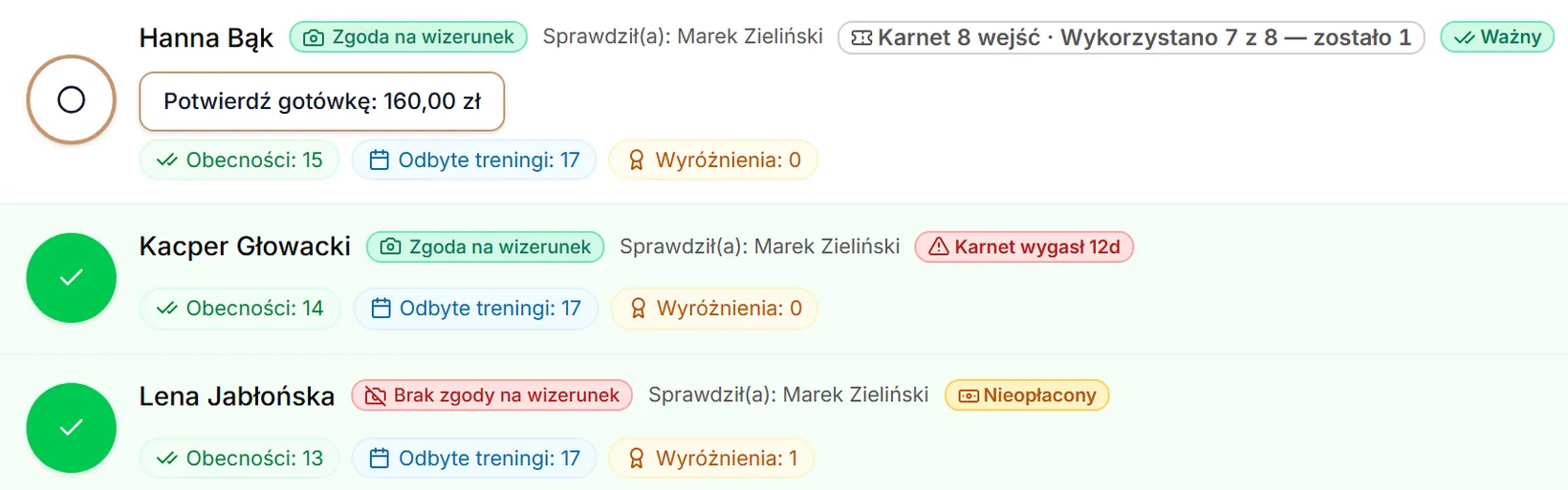
Staff: attendance
A group list with attendance and pass status.
How it works
A list from the schedule
After opening “Attendance”, the coach sees today’s classes and the group’s list of participants.
Taking attendance
One by one or “All present” with one click, including marking an excused absence.
QR code check-in
Staff scan the participant’s code from the parent panel, and once self check-in is enabled, the participant scans the class code.
Attendance rates and reports
Attendance goes into attendance statistics, season summaries and the Excel export.
What you get
Attendance on the phone
The same list in the phone’s browser or in the panel added to the home screen. You can limit a coach’s view to their own groups.
Saving without signal
Supported offline marks on a previously opened list can be saved in the PWA once the app confirms saving; sending requires a connection and the same account.
Scanning the participant’s QR code
The code in the parent panel changes every 30 seconds and is single-use. It is scanned by the owner, an administrator or a coach.
Self check-in
The participant scans the class code displayed by the instructor or a printed group code within a time window around the start of the class.
Photo consents on the list
On the attendance list, the coach sees who has no consent for photos.
Attendance rates and export
Attendance statistics, a season summary as a PDF and attendance export to Excel.
Good to know
- In the PWA, only marks on a previously opened list are saved, after the app confirms saving. Keep the app open in Safari/Firefox; clearing browser data can remove the queue. Opening a list, the QR scanner and the parent panel require internet.
- If the browser allows background sync, the PWA can retry sending in the background. Keep the panel open in Safari/Firefox. A connection and the same account are required; an entry paused for review must first be checked by its author.
- Self check-in and the permanent printable QR code are disabled by default. There is no check-in with a PIN or an NFC card.
Frequently asked questions
Does the coach need an app?
No. The coach works in the phone’s browser or in the panel added to the home screen. The app from Google Play is for parents and participants.
What if there’s no signal in the hall?
In the PWA, supported marks on a list opened before losing the connection can be kept only after saving is confirmed. Sending requires a connection and the same account; keep the app open in Safari/Firefox. After 7 days from saving or the last manual approval, 5 failed attempts, or an error requiring a decision, the entry needs its author's review. Before retrying, check that the action has not already been completed.
Who can take attendance?
The owner, an administrator and a coach. You can limit a coach’s view to their own groups, and QR code scanning is available to all staff.
How much does Klubownik cost?
Plans differ by the limit of active participants, text messages and file storage — the features are the same. Monthly prices incl. VAT: Starter PLN 49 (up to 50 participants); Standard PLN 99 (up to 150 participants); Pro PLN 179 (up to 500 participants). Paying yearly costs less, and the first 30 days are free, no card.
Ready for professional club management?
Create your club and try Klubownik with your own club’s data. The first 30 days are free.
A new owner’s first club starts with a 30-day trial without a card. Additional clubs use the owner’s subscription.
No credit card required • Core features and an industry module for 30 days, up to 500 participants